3D Cowboy Hat SVG: A Practical Guide to Flawless Paper Crafting
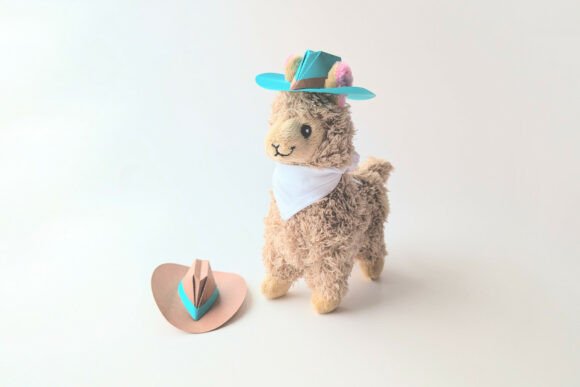
The 3D Cowboy Hat SVG has become a staple for paper crafters looking to add a touch of Western charm to their projects. Whether you are creating party favors, classroom decorations, or unique gift tags, this design allows you to transform flat sheets of paper into adorable mini cowboy hats with impressive depth and character. The appeal lies in its versatility; it bridges the gap between digital design and tangible creation, offering a hands-on experience that feels rewarding from the first cut to the final fold. However, the difference between a crisp, professional-looking hat and a crumpled, ill-fitting mess often comes down to understanding the file formats, scaling principles, and assembly techniques specific to this type of vector art.
Understanding the File Formats and Your Tools
One of the most common hurdles beginners face is not realizing that a single download contains multiple file types, each serving a distinct purpose. When you acquire a 3D Cowboy Hat SVG, you are typically receiving a package that includes SVG, PNG, DXF, and EPS files. Many users make the mistake of opening the wrong file in their cutting software, which can lead to wasted material and frustration. For instance, the PNG is strictly a non-cuttable reference image meant for visualizing colors or printing a preview; attempting to use it as a cutting template will result in a rasterized outline that your machine cannot follow accurately.
If you own a desktop plotting machine like a Cricut Explore or Silhouette Cameo, the SVG format is your primary tool. This file type ensures that the lines remain sharp and scalable regardless of the size you choose. It is fully editable within software like Cricut Design Space or Silhouette Studio, allowing you to adjust dimensions without losing quality. Conversely, if you are working with different hardware, such as a Brother ScanNCut or a Graphtec cutter, the DXF format is often the preferred choice. Similarly, designers who wish to manipulate the vector paths in advanced editing software should utilize the EPS file. Understanding these distinctions prevents the common error of forcing a file format to work when it simply isn't designed for that specific workflow.
The Critical Importance of Proportional Scaling
A frequent oversight that ruins otherwise good designs is improper scaling. Because the 3D Cowboy Hat SVG consists of multiple interlocking pieces, resizing one element without adjusting the others breaks the structural integrity of the final model. If you stretch the brim but leave the crown at its original size, the tabs will not align, and the hat will fail to assemble. Always ensure that you scale all pieces equally and proportionally within your cutting software. Most modern design platforms have a "lock aspect ratio" feature; keeping this enabled is essential to maintain the geometric relationship between the hat's components.
Consider a scenario where a crafter wants a larger hat for a centerpiece. They might be tempted to drag the corner handle of just one piece to increase its size. This action distorts the proportions, making the tabs too short or too long relative to the slots they need to fit into. The better approach is to select the entire group of pieces before resizing. By treating the design as a single unit during the scaling process, you guarantee that every tab, slot, and curve remains compatible. This simple step saves significant time during the assembly phase and ensures the finished product stands upright and looks polished.
Choosing the Right Materials for Durability
While the instructions included with the 3D Cowboy Hat SVG often suggest standard cardstock, the choice of paper significantly impacts the final outcome. Using paper that is too thin, such as standard printer paper, results in a flimsy hat that collapses under its own weight. On the other hand, using material that is too thick, like heavy chipboard, can prevent the tabs from sliding smoothly into their slots, requiring excessive force that may tear the paper. The sweet spot usually lies in medium-weight cardstock, typically ranging from 65 to 80 lb cover weight.
Another practical consideration is the texture of the paper. Some textured or heavily embossed papers can interfere with the precision of your cutting machine's blade, leading to jagged edges that compromise the clean look of the hat. If you plan to use patterned paper, ensure the grain direction does not weaken the structural folds. For those who prefer to cut by hand rather than using a machine, selecting a paper that scores easily is vital. A craft knife and a metal ruler can achieve excellent results on the right material, provided you take the time to score the fold lines lightly before bending them. This technique creates crisp creases without cracking the fibers, which is essential for the 3D effect to hold its shape.
Navigating Software and Assembly Resources
Not everyone owns a dedicated cutting machine, and that is perfectly fine. The 3D Cowboy Hat SVG is accessible to paper crafters who prefer traditional methods. You can open the SVG file using free software like Inkscape or Photopea to print the template directly onto your chosen paper. Once printed, you can carefully cut out the shapes with scissors or a craft knife. While this method requires more patience, it offers complete control over the cutting process and eliminates the need for expensive hardware.
Assembly is where many projects stall. Even with perfect cuts, the folding and gluing process can be tricky if you are unfamiliar with 3D paper construction. To mitigate this, the download package includes a link to a tutorial video located in the ZIP folder. Watching this video before starting can save hours of trial and error. Visual demonstrations clarify how to orient the tabs, apply adhesive effectively, and sequence the folds to build the hat layer by layer. Skipping this resource often leads to confusion about which side of the paper faces inward or outward, resulting in a hat that looks inside out or fails to close properly.
Evaluating Quality Before You Begin
Before committing to a project, it is wise to evaluate the design file itself. Check the resolution of the preview images to ensure the details are clear. Verify that the file includes all necessary components; a complete 3D design should have separate layers for the brim, crown, and any decorative elements. Additionally, test your cutting settings on a scrap piece of paper before running the full design. Different machines and blades require specific pressure and speed settings depending on the paper thickness. Running a test cut ensures that your blade is deep enough to slice through the cardstock but not so deep that it damages your cutting mat.
By paying attention to these details—from selecting the correct file format to mastering proportional scaling and choosing the right paper—you can elevate your crafting results significantly. The 3D Cowboy Hat SVG is a powerful tool for creativity, but its potential is unlocked only through careful preparation and execution. Whether you are a seasoned entrepreneur producing custom goods or a hobbyist making gifts for family, taking the time to understand these nuances ensures that your final creations are as durable and delightful as they are visually appealing. With the right approach, you can avoid common pitfalls and enjoy a smooth, satisfying crafting experience.