Bringing Spring to Life: A Guide to the Cute Easter Chick Laser Cut File
As the seasons shift and spring arrives, the desire to decorate homes with cheerful, festive elements grows stronger. Among the most beloved symbols of this season is the baby chick, representing new life, renewal, and the joy of Easter. For crafters, DIY enthusiasts, and small business owners, creating these decorations has never been easier thanks to modern digital design tools. The Easter Chick Decor Laser Cut File offers a perfect blend of cuteness and technical precision, allowing makers to transform simple materials into stunning 3D centerpieces. This article explores everything you need to know about this digital product, from its design features to how it fits into your creative workflow.
Understanding Digital Downloads for Craft Projects
Before diving into the specifics of the Easter Chick design, it is essential to understand the nature of the product itself. When purchasing an Easter Chick SVG or similar files, buyers are acquiring a DIGITAL DOWNLOAD. This means no physical item will be shipped to your doorstep. Instead, upon purchase, you receive a collection of vector files that can be instantly downloaded to your computer or tablet.
This model has revolutionized the crafting industry by eliminating shipping costs, reducing wait times, and providing immediate access to high-quality designs. It empowers creators to produce as many physical items as they wish, provided they adhere to the licensing terms. Whether you are a beginner looking to make a single decoration for your own home or an experienced maker running a small Etsy shop, understanding the digital format is the first step toward success.
The Power of Vector Files in Modern Crafting
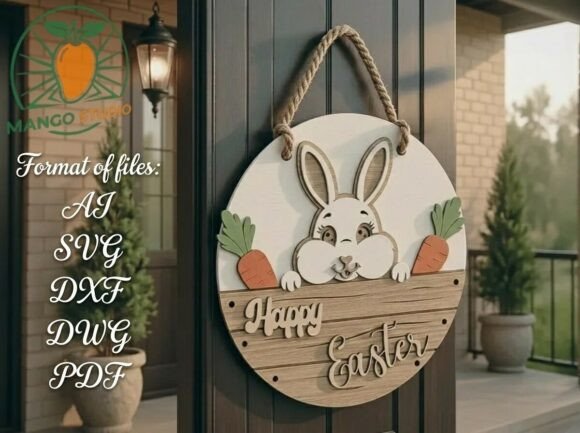
The true magic of this product lies in its file formats. The package includes SVG, DXF, DWG, EPS, AI, and PDF files. Each of these serves a specific purpose within the ecosystem of laser cutting and CNC machining:
- SVG (Scalable Vector Graphics): Ideal for web use and compatible with software like Cricut Design Space and Silhouette Studio.
- DXF (Drawing Exchange Format): The industry standard for CAD software and laser cutters, ensuring precise path recognition.
- AI and EPS: Professional-grade vector formats used in Adobe Illustrator for detailed editing and scaling.
- PDF: Useful for printing instructions or viewing the layout on any device.
These formats ensure that the design remains crisp and clean regardless of how large or small you scale it. Unlike raster images (like JPEGs) which pixelate when enlarged, vector files maintain smooth edges, which is critical for laser cutting where precision determines the fit of layered pieces.
Design Features: More Than Just a Cartoon Chick
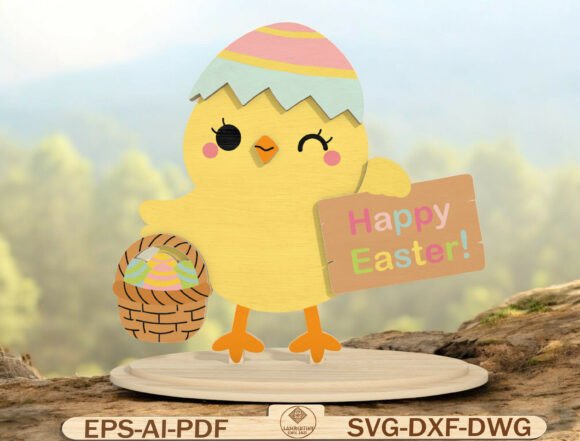
The Cute Easter Chick SVG design is not merely a flat image; it is a thoughtfully engineered project designed for assembly. The character features a smiling baby chick wearing an eggshell hat, holding a basket filled with eggs, and carrying a "Happy Easter" sign. What makes this design stand out is its layered 3D construction.
Layered Assembly for Depth and Charm
Designed with clean layers and smooth edges, this file allows you to cut individual components from wood, MDF, or acrylic. By stacking these layers, you create a three-dimensional effect that adds depth and visual interest to any shelf or mantel. The separation of the chick, the hat, the basket, and the sign ensures that each part cuts cleanly without interference.
This approach is particularly beneficial for beginners who might struggle with complex, single-piece cuts. Layered projects are forgiving; if one piece is slightly imperfect, it can often be hidden behind another layer during assembly. Furthermore, the ability to mix materials—such as using birch plywood for the body and colorful acrylic for the basket—opens up endless customization possibilities.
Compatibility: Making It Work With Your Tools
One of the greatest advantages of this laser cut file is its broad compatibility. Whether you are working in a professional workshop or a home garage, this design is ready for your machine. It is fully compatible with popular devices such as:
- Glowforge: A favorite among hobbyists for its ease of use and cloud connectivity.
- xTool and Omtech: Robust CO2 laser systems ideal for cutting thicker woods and acrylics.
- LightBurn: The leading software interface for controlling various laser engravers.
- Cricut: While primarily known for vinyl and paper, Cricut machines can handle thin balsa wood or cardstock with the right blade.
For those using CNC machines, the DXF and DWG files provide the necessary coordinate data to carve the design into solid blocks of wood or foam. This versatility ensures that the file is a valuable asset regardless of the specific technology you own.
Practical Applications: Where Can You Use This Design?
The utility of the Easter Chick Decor Laser Cut File extends far beyond a simple decoration. Its cheerful aesthetic and sturdy construction make it suitable for a variety of contexts in modern life and business.
Home Décor and Seasonal Displays
For homeowners, this design is perfect for creating unique spring shelf décor. Imagine a row of these chicks on a bookshelf, each holding a different colored basket. They serve as delightful conversation starters and add a touch of warmth to nurseries, playrooms, or farm-themed living spaces. Because the materials used (wood, MDF, acrylic) are durable, these decorations can be stored and reused year after year, making them a sustainable choice for seasonal decorating.
Educational and Community Projects
In educational settings, this file can be adapted for Kids Easter crafts. Teachers can cut the pieces in advance, allowing children to focus on the assembly and painting process. This activity fosters fine motor skills, creativity, and an appreciation for engineering concepts like layering and structural integrity. Similarly, community centers can host workshops where families build their own Easter decorations together.
Small Business Opportunities
Perhaps most importantly, this digital download opens doors for entrepreneurs. The license typically allows users to sell physical products made from this file. This means you can turn a simple download into a profitable venture. You could sell finished wooden signs at local craft fairs, list them on online marketplaces, or offer custom painted versions as premium handmade gifts. The low overhead cost of digital files compared to manufacturing molds makes this an accessible entry point into the small business world.
Common Misunderstandings and Licensing Clarity
As with any digital product, there are common assumptions that need clarification to ensure a positive experience for both the buyer and the creator.
Digital vs. Physical Expectations
A frequent source of confusion is the expectation of a physical shipment. It is crucial to reiterate: No physical product will be shipped. The value lies entirely in the intellectual property—the design files themselves. Once downloaded, the responsibility for sourcing materials and operating the machinery falls on the user. This distinction is vital for managing expectations regarding delivery times and material quality.
Licensing Boundaries
While you are encouraged to sell the physical items you create, there are strict boundaries regarding the files themselves. Files may NOT be resold, redistributed, or shared in their original digital format. You cannot take the SVG or DXF file and sell it on your own website or give it away for free. The license grants you the right to manufacture, not to replicate the digital blueprint. Respecting these terms supports the designer's livelihood and ensures that high-quality resources continue to be created for the community.
Getting Started: A Step-by-Step Overview
Ready to bring this adorable chick to life? Here is a simplified workflow to get you started:
- Purchase and Download: Buy the file and save the zip folder containing all formats to your computer.
- Select Your Material: Choose 3mm to 6mm MDF, birch plywood, or acrylic depending on your desired finish and machine capabilities.
- Import the File: Open the appropriate file format (e.g., DXF for LightBurn, SVG for Glowforge) in your machine's software.
- Nest and Scale: Arrange the layers on your virtual workspace to maximize material usage. Adjust the size if necessary.
- Set Parameters: Configure your power, speed, and frequency settings based on your material type.
- Cut and Assemble: Run the machine, then carefully sand the edges if needed. Stack the layers using glue or adhesive dots to create the 3D effect.
Conclusion: Celebrating Creativity with Technology
The Easter Chick Decor Laser Cut File represents the intersection of traditional holiday spirit and modern manufacturing technology. It offers a fun, eye-catching project that is accessible to beginners yet sophisticated enough for experienced makers. By understanding the digital nature of the product, the versatility of its file formats, and the ethical guidelines of its license, you can confidently utilize this resource to enhance your home, educate others, or grow your business.
Whether you are hanging a "Happy Easter" sign in your window or selling handcrafted chicks at a spring market, this design provides the foundation for memorable creations. Embrace the joy of making, and let the cheerful smile of this little chick brighten your spring season.